Help
What can be listed on What’s On Melbourne?
To list your business or event on the What’s On Melbourne website, it must meet the following criteria:
Located within the City of Melbourne boundary, and have a physical presence where visitors can access your business or event
Have destination appeal and support visitation to the city by providing a tourism or leisure experience
Open to the general public
Aligns with one of the following categories – event, hospitality, retail, attraction or hotel
For detailed information and exclusions for each listing category please visit our Listing Criteria page.
Note that all listings are subject to review and editing to meet the City of Melbourne’s guidelines. Publication of an event is not an endorsement. The City of Melbourne reserves the right to accept, decline or remove any listing at any time
What is the City of Melbourne boundary?
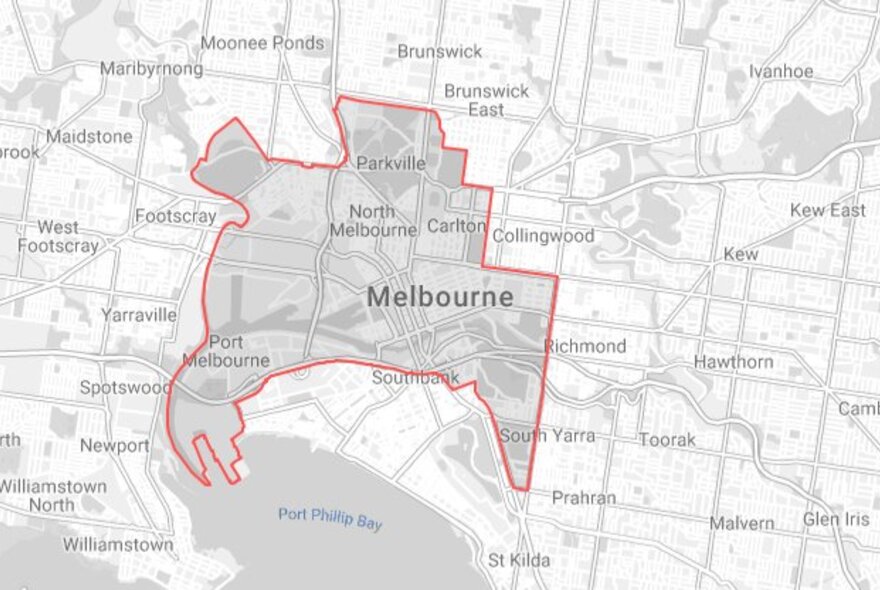
The municipal council boundary for the City of Melbourne is shown on the map below. Only listings within this boundary can be published on What’s On Melbourne.
Why should I create a listing on What’s On Melbourne?
What’s On Melbourne amplifies eligible city businesses and events at no cost. Our website reaches over 10 million users a year across a wide range of demographics, and our marketing channels attract over a million followers. Melburnians and tourists alike view What’s On Melbourne as a trusted, independent source for all the best things to do and see in the city.
By listing on our site, your business or event may be featured across a range of advertising, social media, and campaigns. From curated lists and articles to trending videos, our team tailors and amplifies listings to optimise engagement and conversion with our audience. Create your listing for free.
I didn’t receive my verification or password reset email
If you didn’t receive your verification or password reset email, try the following:
Check your spam or junk folders
Repeat the steps to reset your password
Try sending the verification email again
How long will it take to publish my listing?
Your listing will be reviewed within two business days. Once approved, it will go live immediately. If your listing needs urgent review, please Contact us after submitting.
How do I claim a listing?
If you find an existing listing on the website for a business or event that you own or manage, please contact our team . It is helpful if you provide us with the name of the listing, a link to the existing listing, and your relationship to the business or event.
We may ask for proof of ownership or relationship and will be able to transfer ownership of a listing once confirmed. Once you own a listing, you can update the images, description, hours, and other information.
How do I update a listing?
Listers are responsible for the maintenance and accuracy of their business or event listings. To update your listing, follow these steps:
Log in to your account in the Lister Portal
You will see the listings you manage on your account page
Find the listing you want to update and click the “Actions” dropdown button
Click the edit button
Update the listing as needed, review your changes, and submit it
Our team will review your updates within 2 working days and will either approve or decline your changes
You will receive an email with the outcome of the decision
Why was my listing declined?
Your listing will be declined if our editors determine that it doesn’t meet our Listing Criteria. Specific feedback can be viewed by selecting your listing from your dashboard.
Your listing also may be declined if we can’t verify it due to insufficient information, or if there are concerns for public health or safety.
Note that all listings are subject to review and editing to meet the City of Melbourne’s guidelines. Publication of an event is not an endorsement. The City of Melbourne reserves the right to accept, decline or remove any listing at any time
Why has my listing information changed?
We reserve the right to modify any of the content submitted to ensure it meets City of Melbourne guidelines.
What are the photo requirements?
You can add up to four images to your listing.
Photos must be:
JPG or PNG format
Less than 5MB
As high resolution as possible and not blurry
Free of logos or text
Representative of your business or event
Approved for use by the copyright owner
Taken in a lawful, fair and direct manner
Not AI generated
We will not publish posters/flyers, images with text or logos, images that contain nudity or those that may be offensive or defamatory.
If people can be identified in an image, you must have their written permission. If children can be identified you must also have written consent from their parent/guardian.
Note that your content may appear on other City of Melbourne websites and social media, and may be provided to other websites or organisations.
Can I add accessibility information to my listing?
Yes, we have added an accessibility section to business and event listings. As a listing owner, you can select which accessibility features are available at your business or event.
Please ensure you read the definitions closely and only select features that currently exist at your business or event. Do not select any features that you are planning to add in the future or that do not meet the full definition. Refer to the Accessibility Guidelines page for further information.
As this information is self-reported and not verified by a third-party, it is important that you try to be as accurate and truthful as possible.
What is a special offer?
Special offers highlight simple, time bound value adds provided by a business or event. They must be easy to understand at a glance and provide a clear incentive for visitors to book, attend or purchase. Each listing may include a maximum of three special offers.
How to list a special offer
Once you have created your business or event listing, email your special offer to whatson@melbourne.vic.gov.au
The team will review your submission, and if approved, add the offer to your listing.
Please include:
Offer title: 35–50 characters
Body copy: Max 100 characters (include any essential T&Cs if applicable, or add them to the destination your offer links to if they exceed the character limit)
Offer availability: Start and end date/time, or days/times available
Website link: Offer must be clearly stated on the website, including how to redeem
Social media link: All offer details must be clearly stated in the post, including how to redeem
What's On listing link: Please include the listing link you would like your special offer/s added to
Optional image: JPG or PNG, max file size 5MB
Eligible offer examples
Flat discounts or deals (e.g. 20% off, 2 for 1)
Value deals (e.g. stay X nights, get X free)
Bundles or packages with nearby venues or events (e.g. Dinner + show deals, stay and get 20% off theatre tickets)
Exclusive or one-off experiences (e.g. themed rooms, takeovers, limited run packages)
Ineligible offer examples
Hotel room types or complimentary extras (e.g. breakfast, parking, wine, late checkout)
Everyday pricing or vague value statements
Loyalty only or member only deals
Best practice special offer examples:
Stay 3 nights, save 15%
Save 15% when you stay three consecutive nights. Valid for stays until 16 January 2026.
2 for 1 drinks with MICF ticket
Flash your MICF ticket to enjoy 2 for 1 on selected spirits. Valid until 19 April 2026.
20% off storewide for Black Friday
Enjoy 20% off in store only. Ends 2 December 2026.
Support for your business or event
Here are some helpful resources about business support and promotional opportunities that the City of Melbourne can provide for your business or event:
Guide to doing business in the City of Melbourne and business support information
Learn about opportunities to promote your business or event through our marketing channels
Subscribe to the Business in Melbourne newsletter for regular updates on news, grants, free training and support
Contact the What's On Melbourne team
Do you have a question or want to give feedback? If you’re referring to a particular listing, please include details (name or link) in your message.